DataTemplates are a pretty useful feature in WPF, but wouldn’t it be great if you could change the data template based on the size available to display the data? Several media players (including the Zune player) present a kind of ‘postage-stamp-sized’ UI when shrunk below a certain size. Date columns in the Finder in OSX are another example of UI that adjusts to the available space – as the width of the column increases the format of the date changes to show more information. I wanted to bring this kind of capability to WPF.
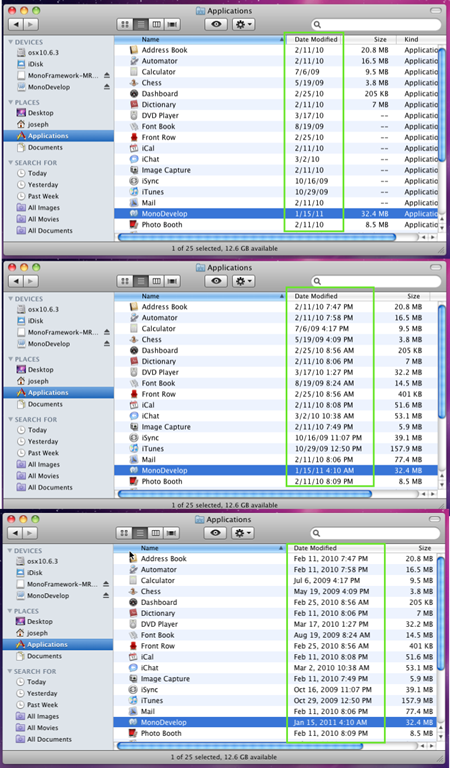
Fortunately WPF has the built-in support for programmable template selectors, in the form of the (aptly named) DataTemplateSelector, so I created the SizeBasedTemplateSelector. You set it up with one or more templates, and specify what the minimum and maximum sized for those templates should be. Then as the content is re-sized it changes the data template as required. Templates and their relative sizes are all done declaratively like so:
<l:SizeBasedTemplateSelector x:Key="sizeBasedSelector">
<l:SizeBasedTemplateSelector.TemplateSizes>
<l:TemplateSize MaximumSize="120, 20">
<l:TemplateSize.DataTemplate>
<DataTemplate>
<TextBlock Text="{Binding StringFormat=dd-MM-yy}" FontSize="18" />
</DataTemplate>
</l:TemplateSize.DataTemplate>
</l:TemplateSize>
<l:TemplateSize MinimumSize="120, 0" MaximumSize="220, 30">
<l:TemplateSize.DataTemplate>
<DataTemplate>
<TextBlock Text="{Binding StringFormat=dd-MMM-yyyy}" FontSize="19" />
</DataTemplate>
</l:TemplateSize.DataTemplate>
</l:TemplateSize> …
Like all my recent samples it is online at bitbucket as part of the learnwpf.com samples project
Here is a short video of the sample app in action (heavily inspired by the OSX finder)
Comments
The Windows Client Developer Roundup aggregates information of interest to Windows Client Developers
Dew Drop – August 10, 2011 | Alvin Ashcraft's Morning Dew